Bipolar Mood Chart: Your Highs and Lows Over a Month
A bipolar mood chart records the highest and the lowest mood of each day on two separate scales. See a sample month below, then chart your own.
What a Month of Tracking Looks Like
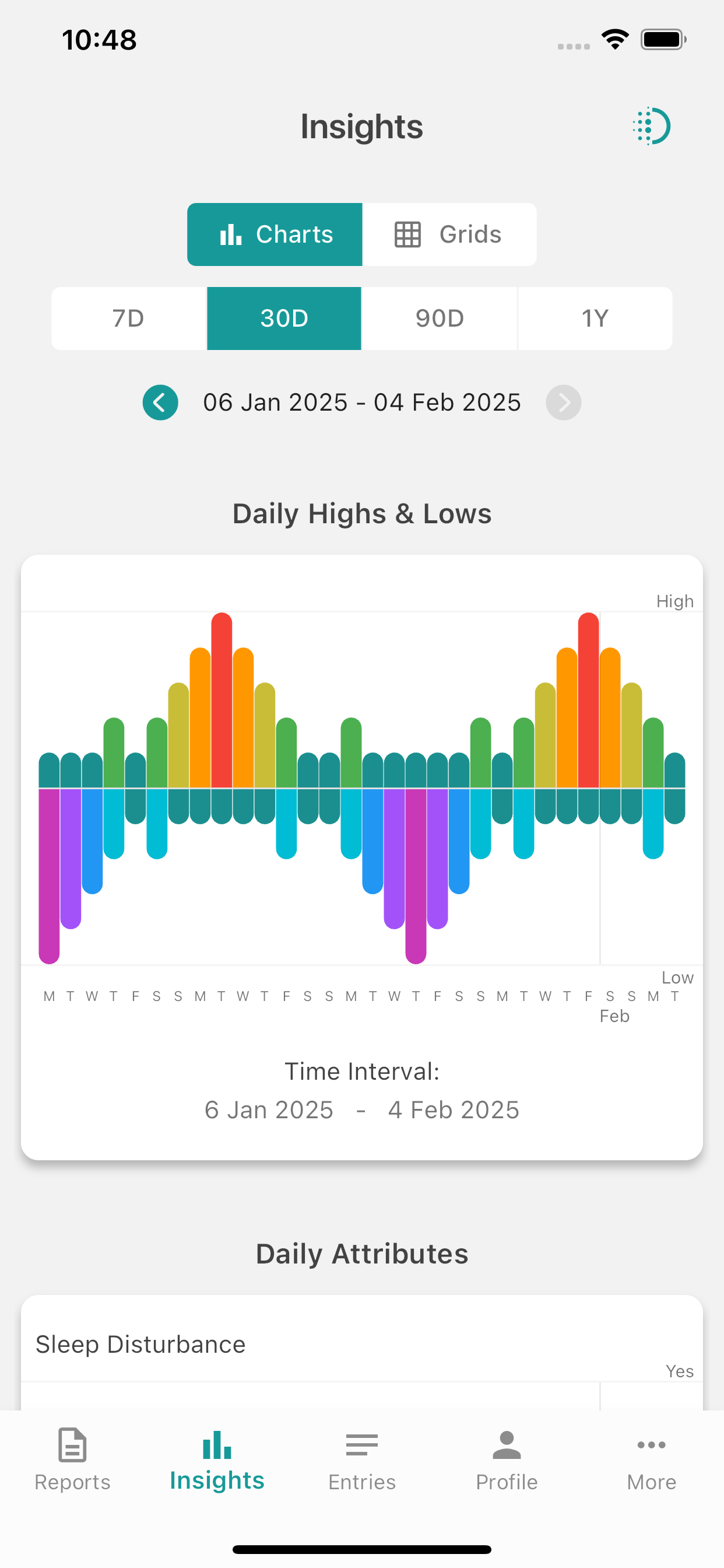
Each column is one day. The bar above the line is the highest mood reached that day, the bar below is the lowest.
Last 30 days
Sample data · not a real personSample data only. This chart is generated from a fixed illustrative pattern, the same one the app shows new users in its Insights preview. It does not come from a real person, and it is not meant to show what bipolar disorder typically looks like. Hover or tap a bar to see its levels.
High scale
Low scale
Why two scales instead of one mood score?
A single mood number hides a lot. A day that starts in exuberance and ends in sadness averages out to nothing on a one-number scale. Psychiatrists have long asked people to chart highs and lows separately for exactly this reason, so the chart has a high side and a low side.
Taller bars mean a stronger high or low. A short teal bar on both sides is a neutral day, which is a valid and useful entry in its own right. Over a month, the shape of the bars shows you how long a high or a low lasted and how quickly it changed.
The app draws this for you.Log your highest and lowest mood each day and the chart builds itself, with a calendar mood grid and reports alongside.


Chart Your Own Last 30 Days
Tap a cell above the line for the highest mood you reached that day, and one below the line for the lowest. Then save your chart as a PDF or an image.
Your last 30 days
bipolarmoodtracker.comTap above the line for your highest mood, below for your lowest. Tap again to clear. Keyboard: arrow keys move, Enter sets.
High scale
Low scale
For personal tracking only. This chart is not a medical device and not a replacement for medical treatment. Consult your doctor about any symptoms.
Your entries stay on this page only. Nothing is sent anywhere or stored, and they are gone when you close the tab. "Save as PDF" opens your browser's print dialog, where you can choose Save as PDF.
Try it on a few days above. The app does this every day, properly.Daily reminders so you do not forget, notes and custom attributes like sleep or medication, a calendar mood grid, and PDF reports you can share with your doctor. Your entries stay on your phone instead of disappearing when you close this tab.
How to Fill In a Bipolar Mood Chart
The chart above follows the same steps as a daily entry in the app.
- Find the day. Each column is one day, with today on the right. Fill it in at the same time each evening so the habit sticks.
- Tap your highest mood. Above the line, tap the highest level you reached at any point that day, from 1 Neutral to 5 Psychotic Mania. Rate the peak, not the average.
- Tap your lowest mood. Below the line, tap the lowest level you reached, from 1 Neutral to 5 Psychotic Depression. Neutral on both sides is a normal entry.
- Add the details in the app. Hours of sleep, a medication change, a big event. On this page there is no room for them. In the app they are notes and custom attributes you can track and chart on their own.
Bringing the chart to an appointment
A month of highs and lows on one sheet gives your doctor or therapist something concrete to look at, instead of trying to remember how the last few weeks went. Save the chart above as a PDF and bring it along. If you use the app, the same entries export as a PDF report, with or without your notes, that you can share directly from your phone.
Mood Chart Questions
What is a bipolar mood chart?
Is the sample chart on this page real data?
Can I chart my own mood on this page without the app?
What do the ten mood levels mean?
Get the App That Draws This
Log your highest and lowest mood in a few taps. The app builds this chart for you over time, plus a calendar mood grid and PDF reports you can share.
Free to use. Premium features available.